BOM Block of the month wonder quilt Sashing and Borders
 Download Assembly Instructions PDF

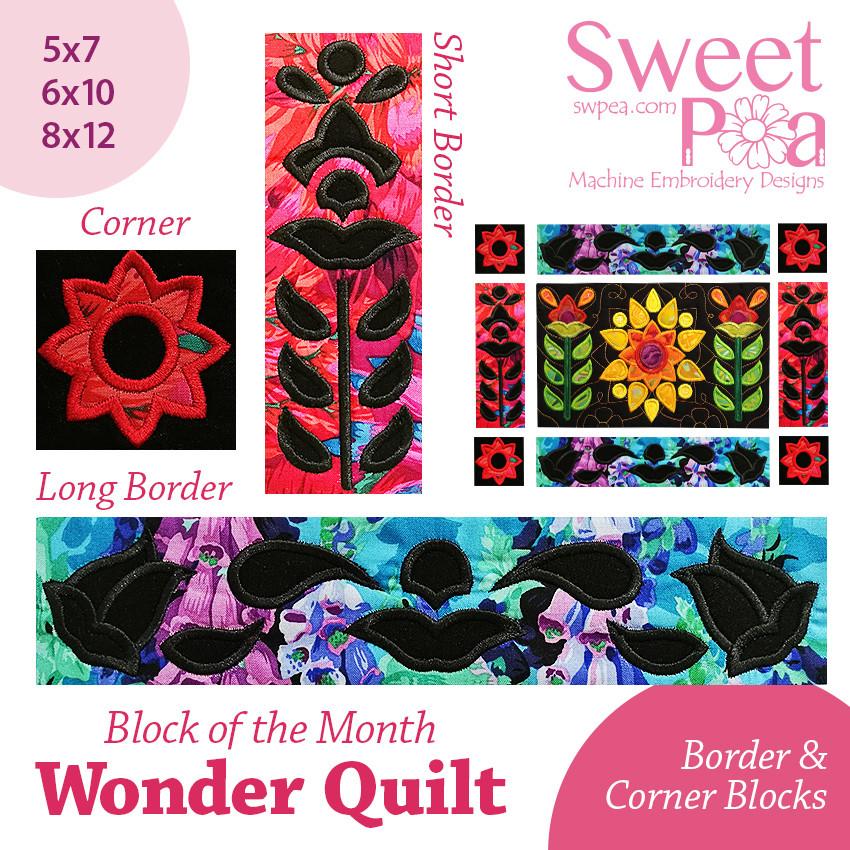
BOM Block of the month quilt Sashing and borders in the 5x7 6x10 and 8x12 hoop machine embroidery design
This is the design for the border blocks which match the length and width of your BOM panel blocks. There is also a corner block for your use.
Please also order the free instructions for adding the sashing, borders and binding here:
https://swpea.com/products/bom-block-of-the-month-wonder-quilt-how-to-add-sashing-and-borders
We are going to be making a Block of the Month quilt with a different quilt block released each month. There will be 12 different rectangular blocks to make. The idea is to use each block once and make a wall or lap quilt but you could include multiple of the same block if you choose to make a much larger quilt
We recommend you use a plain background fabric for this quilt. We are going to be using black for all our backgrounds but you could use white or coloured backgrounds if you choose.
The blocks are quilted in the hoop.
Full photo instructions and directions on how to sew the block are included with your purchase .
We will be adding instructions on 'How to add the sashing, borders, backing and binding to the BOM quilt soon.
Designs are provided in 8 different embroidery formats. The formats included are: DST, EXP*, JEF, PEC, PES, VIP, VP3 and XXX.
*BMP and INF files are also provided, these are recommended to be used with the EXP files for Bernina machines.
SVG files are included for cutting machines. Please note the SVG format can be converted to FCM within the Brother Scan n Cut software if required
We test and review each of our designs to ensure the highest quality. Depending on what hoop, fabric and stabiliser combination you are using, results may differ.
Designs are provided in 8 different embroidery formats. The formats included are: DST, EXP*, JEF, PEC, PES, VIP, VP3 and XXX.
*BMP and INF files are also provided, these are recommended to be used with the EXP files for Bernina machines.
SVG files are included for cutting machines. Please note the SVG format can be converted to FCM within the Brother Scan n Cut software if required. Embroidery Designs Cutting Files Disclaimer
Full photo instructions and directions are included with your purchase.
It is our intention to offer you the best service always and for our designs to be the highest quality in the market.
We test and review each of our designs to ensure the highest quality. Depending on what hoop, fabric and stabiliser combination you are using, results may differ.

Designed by Emma Wakeling
Payment & Security
Your payment information is processed securely. We do not store credit card details nor have access to your credit card information.
Video Tutorial
Helpful Resources
Recommended Tools and Notions

Gingher Double-Curved Embroidery Scissors

Sewing & Quilting Clips

JUKI Patchwork Foot

Olfa Rotary Cutter

Clover Seam Ripper (White)

Little Foot TPT (That Purple Thang)

Expert Point and Press Tool

Embroidery Hoops

X-Press It High Tack Double Sided Tissue Tape

Odif 505 Basting Spray 6.22oz Clear

Water Soluble Double Sided Tape

Adjustable Single Cone Thread Stand

Bobbin Case Bobbins
